The Influencer Program / Guides
Get your pins found by thousands of people searching for exactly what you offer
Pinterest works like a search engine, not a feed. Here is how to pick keywords, set up boards, design pins and post on a 90 day plan, shown on real Pinterest screens.
- 6 min read
- Updated Nov 23, 2026
- 100% free community
(Put your real links. No follower minimum, but you need to be an active content creator, otherwise you get rejected)
To go viral on Pinterest, stop thinking like a social media creator and start thinking like a search engine. People type what they want into Pinterest search, and the pins that match their words best get shown. Use the right keywords, post clear pins on a steady schedule, and give it 90 days.
The good news: a pin that works can bring you traffic for years. Pinterest does not bury a pin because it is old or because it did not take off in its first few minutes.
How does Pinterest decide which pins to show?
Pinterest is a visual search engine. It works more like Google than like Instagram or TikTok.
People are not there to be entertained. They come looking for something specific, like easy dinner ideas, a minimalist desk setup or a budget planner, and they save things to try or buy later. Most searches are for ideas, not brand names.
Pinterest's job is to pull the pins whose words best match what someone typed. So the words on your pins, boards and profile decide whether you get found. That is also why Pinterest traffic can be so valuable: the people clicking already want help with that exact thing.
How do you pick a niche on Pinterest?
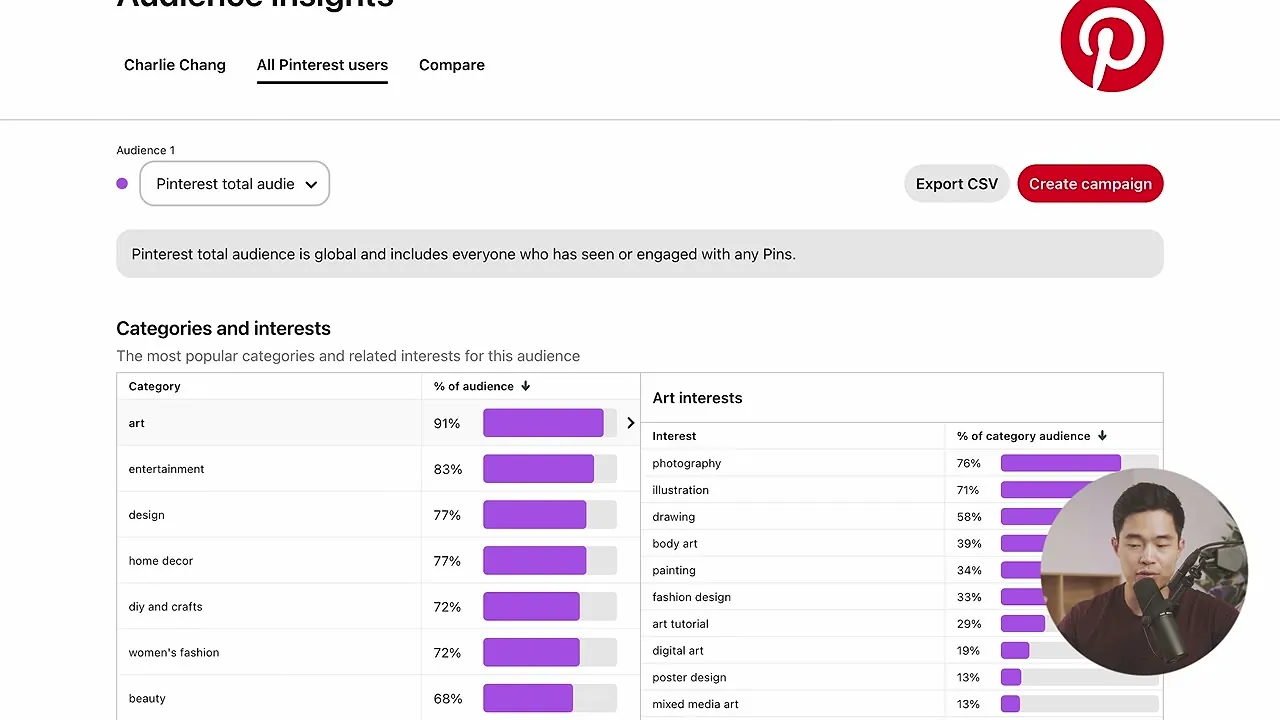
- Check what people already search for. In your business account, open audience insights and look at all Pinterest users. You will see the biggest categories, like art, entertainment, design, home decor, crafts, fashion and beauty, and the topics inside each.
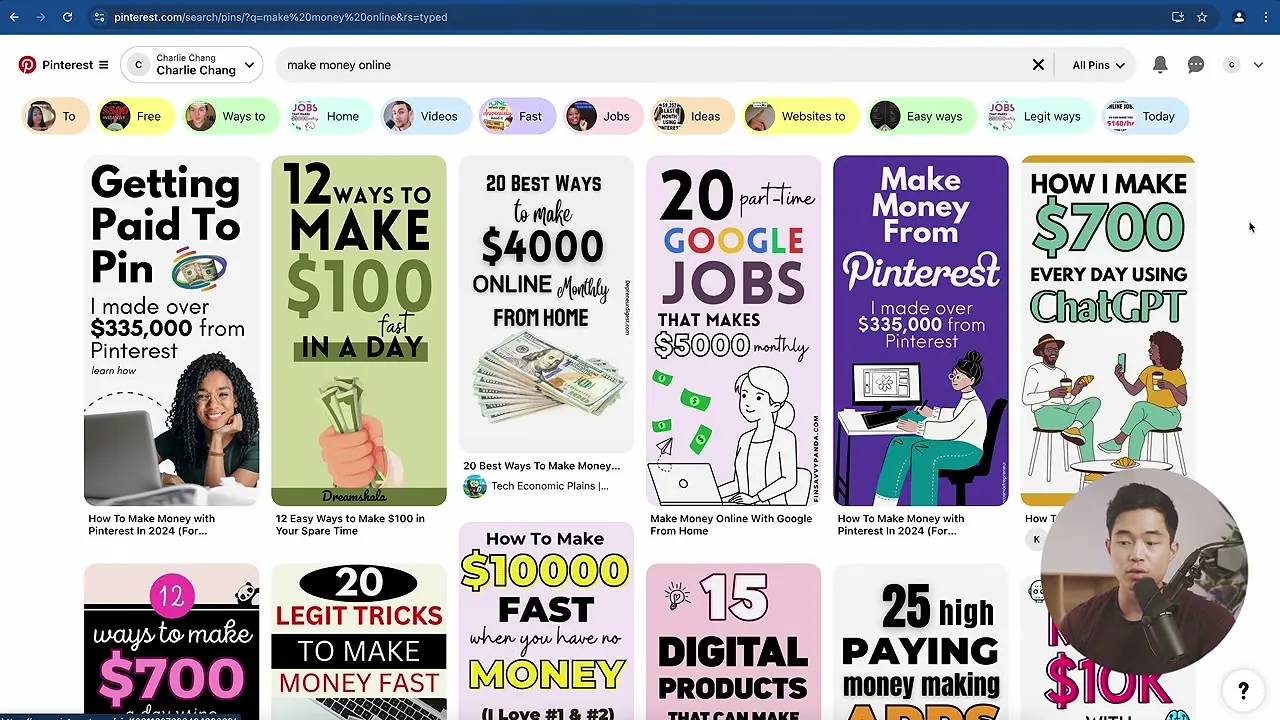
- Check for buyers. Search an idea like gym essentials. If the results are full of products and shopping style pins, people already spend money on that search.
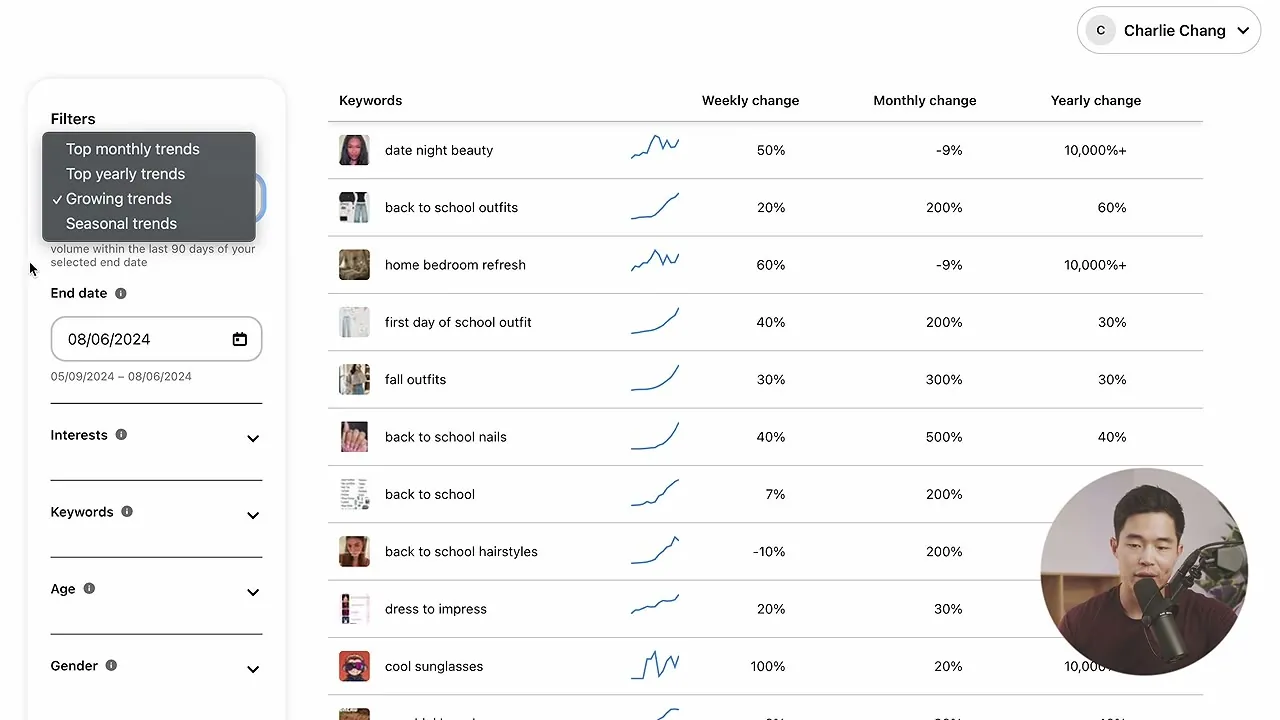
- Pick something you care about and can actually earn from. The top trends are often crowded.
How do you set up your account?
- Make a free business account, separate from your personal one. It keeps your boards about one topic and gives you analytics.
- Claim your website. It tells Pinterest the site is yours and helps it trust your account.
- Put keywords in your profile name. Not only your name. For example, home decor styles for Gen Z.
- Write a short bio that says what you help with and why people should trust you.
- Add a profile photo and a banner so the page looks finished.
How do you find the right keywords?
- Type a topic into the Pinterest search bar and write down every phrase it suggests. Those are things people really search for.
- Open Pinterest Trends and use the search icon to look up your own keywords. You can see when interest rises and falls through the year.
- Later, add longer phrases, like personal budget planner for moms.
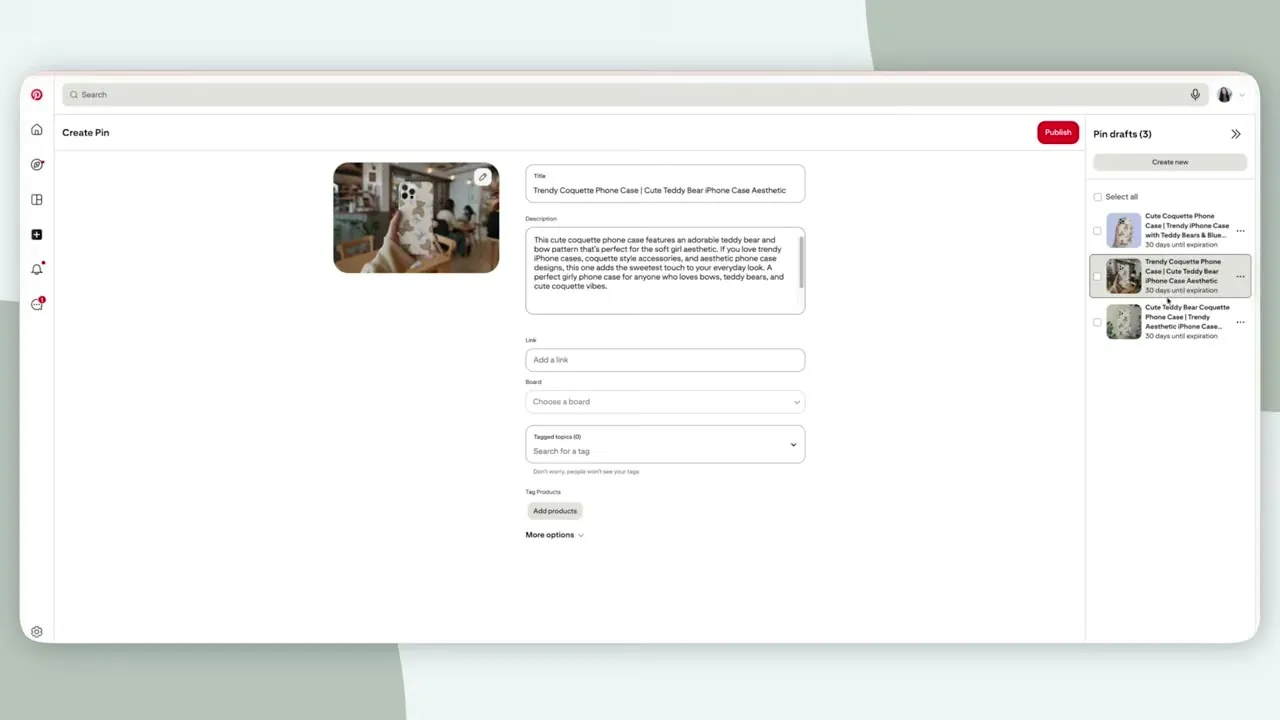
Use your keywords everywhere Pinterest reads: pin titles, pin descriptions, tags, board names, board descriptions and your profile. Your pins can show up on Google too.
How do you set up boards?
Boards are folders for your pins. Each one should be about one keyword group.
Start with 5 to 15 boards, and aim for at least 20 pins on each so they look like real collections. Give every board a title and description with its keywords, so Pinterest knows where to file your content.
What makes a pin people click?
- Big, easy to read text. Bold fonts and colors that stand out in a crowded feed.
- Beautiful pictures. Pinterest users want things that look good. Ugly screenshots do not work.
- The right size. A tall pin of 1,000 by 1,500 pixels.
- A promise. Say what they get when they click.
Templates in a free tool like Canva make this fast. Pins can be videos too, so try both.
The four kinds of pins to rotate
- Freebie pins about a problem your free guide or checklist solves. They send people to your sign up page.
- Product pins about the problem your paid product solves. They go to your sales page.
- Teaching pins with general tips your audience cares about. They go to your blog and build trust.
- Affiliate pins for products you really use. They go to a blog post that explains why you recommend them.
The Influencer Program is a free creator community that teaches you and helps you grow, with free guides and content. We are not talent managers or an agency that signs you, and there is no contract.
Join the free creator program
Free training to grow, a community of creators, and weekly feedback on your videos. No contract.
(Put your real links. No follower minimum, but you need to be an active content creator, otherwise you get rejected)
How often should you post?
Consistency matters more than any single pin. A simple plan:
| What | The number |
|---|---|
| Your own pins a day in month one | At least 3 |
| Other people's pins to save to your boards each day | At least 2 |
| Boards to start with | 5 to 15 |
| Pins on each board | At least 20 |
| Pin size | 1,000 by 1,500 pixels |
| Different pins per product | 3, posted one a week |
| When impressions start to show | Often within 1 to 2 months |
| How long to commit | 90 days |
| Share of Pinterest use on a computer | About 14%, most people use phones |
| What many digital product affiliate programs pay | 50% or more of a sale |
You do not need to sit on Pinterest every day. Make all your pins in one or two days a month, then schedule them with a tool like Tailwind.
If you sell products, make three different pins for each one and post one a week, so your board shows variety instead of the same picture over and over.
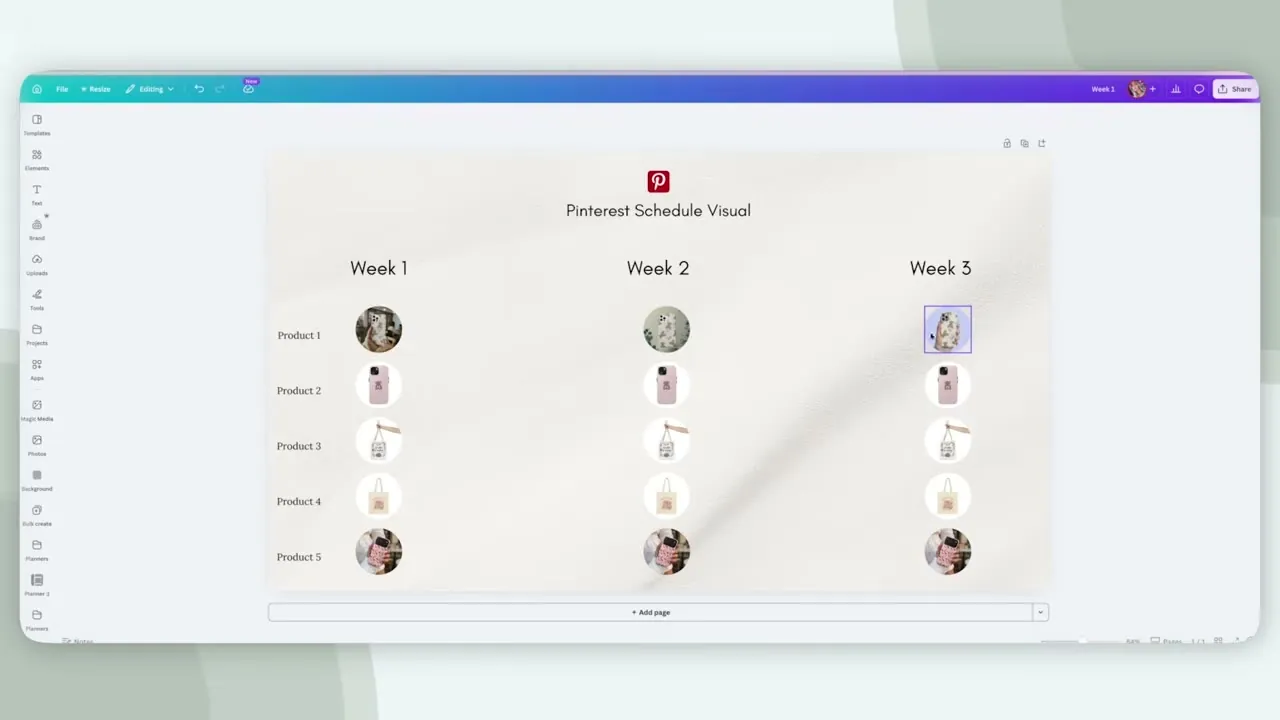
What should you expect in the first 90 days?
Pinterest needs time to index your pins and learn who to show them to.
- Days 1 to 20. Create and schedule pins every day, study what does well in your niche and get into a rhythm.
- Days 21 to 40. Add more keywords, including longer phrases, try new pin styles like videos and infographics, and add boards.
- The rest of the 90 days. Look at your analytics. Which pins get impressions, clicks and saves? Make more like those, and change the hook on the ones that do not work.
Many people quit after two weeks and never see it work. The ones who keep going for 90 days start to see their traffic compound.
How do you make money from Pinterest traffic?
- Send people to a blog post first. Linking straight to an affiliate link rarely works now, and Pinterest may even ban accounts that do it. A blog post gives value, then your affiliate links sit inside it.
- Link to the exact product, not your shop's home page. If you sell on Shopify, you can even link straight to checkout.
- Collect emails. Offer a free checklist or guide in exchange for an email. Views come and go, but your email list is yours.
- Stack your income. Affiliate links, your own digital products, print on demand and an email list can all work together.
Only recommend things you have used and trust. Nothing loses a reader faster than a bad recommendation.
For more, see affiliate links, affiliate blogging and the Amazon affiliate program for creators.
What can you do this week?
- Create a free Pinterest business account and claim your website.
- Type your topic into Pinterest search and write down 20 suggested phrases.
- Make 5 boards with keyword titles and descriptions.
- Design 3 pins in Canva at 1,000 by 1,500 pixels with big, clear text.
- Schedule pins for every day this week, and save 2 pins from others each day.
- Put a reminder in your calendar for 90 days from now to review your analytics.
More guides
- Go viral on TikTok, then keep the people who found you
- Get your TikTok Shop videos pushed to buyers, whatever your follower count
- Write posts on X that people stop for, save and share
- Get YouTube to show your videos to more of the right people
- Give your song the best chance to go viral, and turn the views into real fans
- Make your YouTube channel today and set it up to grow
- Make money on TikTok Shop, starting with your first sale
- Make UGC videos that look real, sell the product and get you hired again