The Influencer Program / Guides
Make short form videos that stop the scroll and hold attention to the last second
How to write the script, build the first frame, film on a phone and cut the edit, with the exact settings to use.
- 7 min read
- Updated Nov 25, 2026
- 100% free community
(Put your real links. No follower minimum, but you need to be an active content creator, otherwise you get rejected)
Short form video means quick vertical videos made for TikTok, Instagram Reels and YouTube Shorts. A good one grabs attention in the first second, keeps a question open in the viewer's head, and pays it off at the end.
You need a phone and a free editing app. The rest is how you write, film and cut.
Why make short form video?
Short videos are often how viewers decide whether to give you more of their time. A viewer watches a few short clips, decides you seem worth it, and then risks ten minutes or an hour on a longer video.
That is why many creators use short videos as a front door to their longer ones.
How do you write a short video people finish?
Use but and therefore, not and then
Every good story moves between context and conflict. You give a little context, then something goes wrong, then you explain, then something else goes wrong. Each conflict opens a loop in the viewer's head, and they stay to see it closed.
A simple test: read your script out loud. If the beats are joined by and then, it feels like a pile of facts. Join them with but and therefore instead.
Vary your sentence length
Sentences of the same length sound flat and push people to swipe. Mix short, medium and long ones. Put each sentence on its own line in your script. If the right edge looks jagged, your rhythm is varied. If every line ends in the same place, rewrite some.
Talk to one friend
Write and film as if you are sending a voice note to one close friend. It sounds like a conversation instead of a speech. If it helps, tape a photo of that friend under your camera lens.
Write the ending first
Decide the last line before anything else. Make it so memorable that someone would share the video for that line alone. Short videos loop, so the last line also sets up the first one. Write the first and last lines, then fill in the middle.
Find your own angle
A good topic is not enough, because many others are covering it. Pick a less common angle. When everyone talked about what a celebrity wore to a game, a video on the business impact of her being there stood out and got a million views.
How do you make a hook that stops the scroll?
People swipe on autopilot. Your first second has to make their brain go, wait, what is this?
- Say what the video is about right away. If the video is about garden tips, the first line should be about garden tips. Skip vague lines like wait till you see this.
- Show while you tell. A picture of the thing you are talking about lands faster than words alone, because eyes are quicker than ears.
- Give context on the first frame. A clip of someone in a kitchen saying I do not cut carbs means nothing without context. Put the context in text at the top.
- Plant a question. Challenge a common belief, like being lean at 45 and eating carbs every day. Then hold back the answer.
- Do not give the answer away on the first frame. If the first frame shows a blueberry latte and says this coffee should not taste good, people solve it and swipe. Blur the clue and they stay.
- Clean up the first frame. Remove clutter, keep text inside the safe zone so the app buttons and caption do not cover it, and make it smaller than you think.
A phone less than about four years old and a kitchen window are enough to make a clean, bright first frame.
How do you film short videos on your phone?
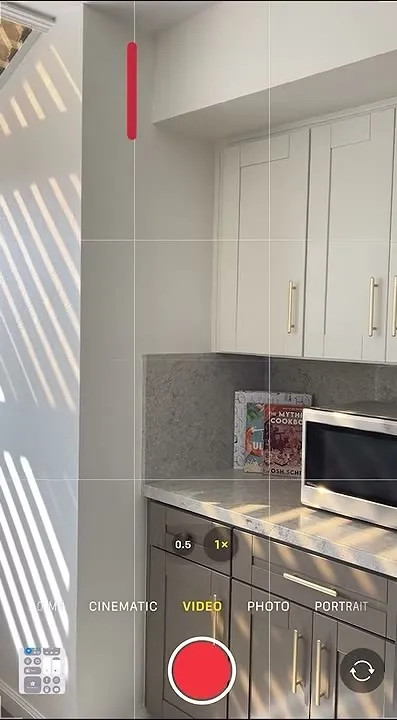
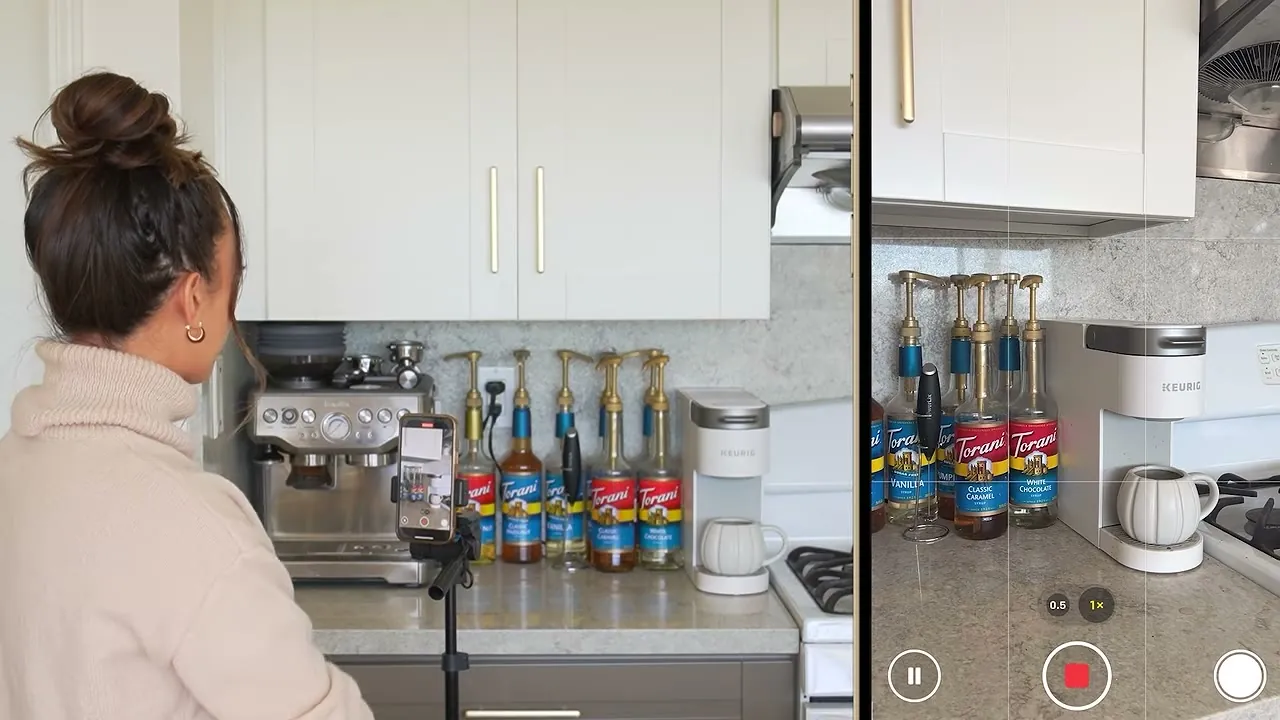
You do not need a tripod to start. Prop your phone on something if you want to be in the shot. If you buy one, get a cheap phone tripod that reaches at least your eye level.
Set your camera up once.
| Setting | What to use | Why |
|---|---|---|
| Record video | 1080p at 30 frames per second | Saves storage, most viewers on phones cannot tell it from 4K, and apps compress uploads to 1080p anyway |
| Enhanced stabilization | On | Steadier footage when you hold the phone |
| Grid and level | On | Helps you line up shots |
| Preserve settings, exposure | On | Your exposure stays where you set it |
| Edit aspect ratio | 9 by 16 | The vertical shape of every short video app |
| Length of each shot in the edit | About 1 to 2 seconds | Keeps the pace up |
| Filter strength | Up to about 30 | More looks cheap |
| Auto captions | About 10 characters a line | Easy to read on a phone |
Then a few habits make a big difference.
- Wipe your lens every time. A smudged lens makes everything dull.
- Line up straight edges. Match a grid line to a ceiling, a wall corner or a cabinet, and wait for the level to show you are straight.
- Lower the exposure for a moody look. Tap your subject to focus, then drag your finger down.
- Film the same action from several angles. Wide, medium, close up, from above, plus reveal and conceal shots where the camera moves past an object.
- Always show movement. A still shot held for three seconds is a photo. Film the pour, the hand reaching in, or the steam rising.
How do you edit short form video?
Cut tight
Cut each shot to the start and end of its main movement and delete everything else. Cut right before a hand or object leaves the frame, so nothing sits still. Then trim again, faster than feels natural.
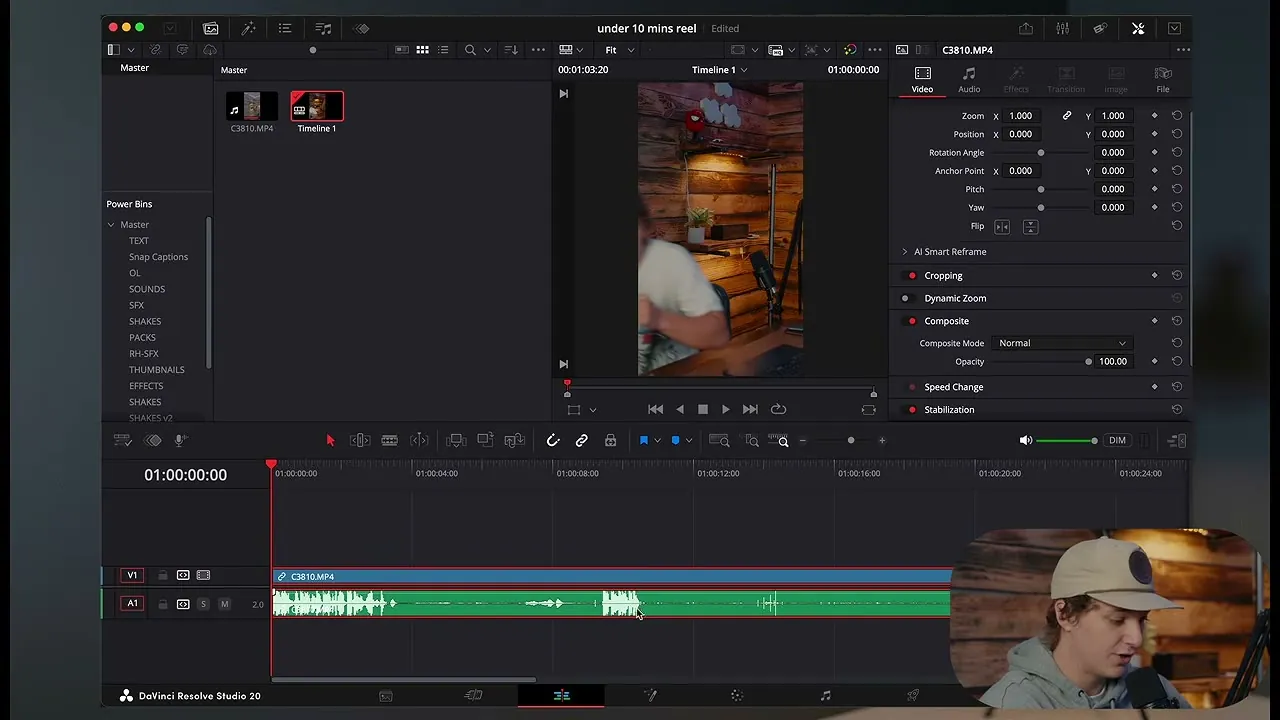
For talking videos, look at the sound wave on your timeline. The flat parts are pauses. Cut them out. Set one key to split a clip and one to close the gap, and a rough cut takes minutes.
Keep the sound running
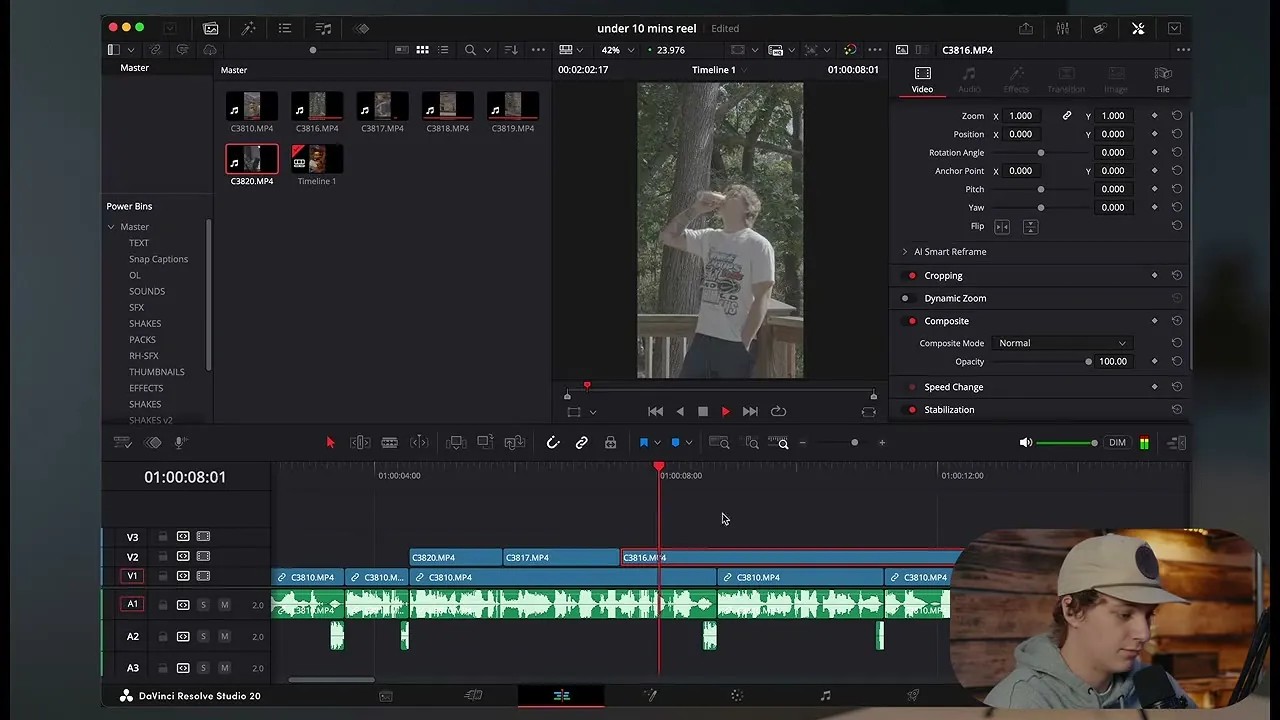
Start each clip's audio a few frames before its picture, about 3 to 4 frames. This is called a J cut. The viewer hears the next line right before they see it, so there is never a gap of silence.
Lay extra footage over the talking parts, matched to what is being said. If you say a thousand thoughts are running through your mind, show the moment you take a sip or look away.
Edit to the beat
To cut on the rhythm of a trending sound, screen record it playing in the app, bring the recording into your editor, and pull out the audio. Cut to its beat. When you post, pick the same sound in the app and line it up.
Make the look consistent
Pick one filter and use it on every video, at about 30 strength. The same look across your feed makes your videos easier to recognize. To make whites look white, lower the saturation of yellow in the color settings.
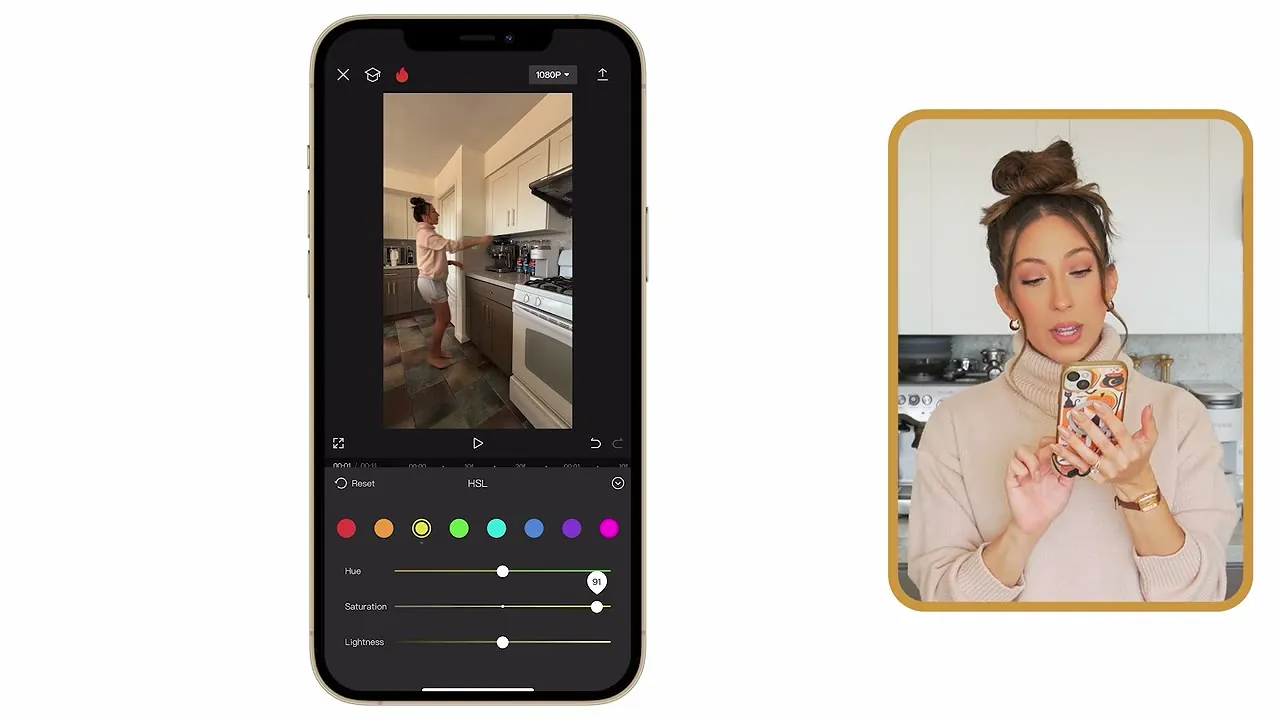
When you export, match the export settings to what you filmed. A mismatch is a common reason uploads look blurry.
Think about what the viewer feels
Good editing is not about flashy effects. Before each cut, ask what the viewer should feel next and what question is in their head right now. Can you delay the answer a little longer? People remember unfinished things better than finished ones, so an open loop keeps them watching.
Small cuts change how someone comes across. Removing a few pauses and breaths can make the same person look more confident. If a viewer finishes and says that editing was cool, the edit got in the way. The goal is for them to say they could not stop watching.
Short videos bring people in. Brand deals and your own offers are how you earn from them later. The Influencer Program is a free creator community that teaches you and helps you grow, with free guides and content. We are not talent managers or an agency that signs you, and there is no contract. For app choices, read the best video editing software for beginners.
Join the free creator program
Free training to grow, a community of creators, and weekly feedback on your videos. No contract.
(Put your real links. No follower minimum, but you need to be an active content creator, otherwise you get rejected)
How do you get more from each short video?
- Post a lot. Volume matters. The more you post, the more chances one takes off.
- Make clips that lead somewhere. Use the same topics as your longer videos so viewers who like a short have more to watch.
- Study your best hooks. Look at which first frames held people and reuse that pattern on new topics.
For platform specific tips, read how to get views on YouTube Shorts and how to edit a video for Instagram.
What can you do this week?
- Change your camera to 1080p at 30 frames per second and turn on the grid and level.
- Write one script with but and therefore between every beat, ending line first.
- Rewrite your last three hooks so the first frame gives context and plants a question.
- Film one simple routine from five angles, with movement in every shot.
- Edit it with 1 to 2 second shots, no silences, and one filter at about 30.
More guides
- Get into the Target affiliate program and earn up to 8% on what your followers buy
- Understand the TikTok algorithm and get your videos to the right people
- Get found by brands on TikTok's creator marketplace, now called TikTok One
- Get paid by TikTok's Creator Rewards Program for your long videos
- Post every day for 30 days on TikTok Shop and know exactly what to measure
- Get a fair commission on every TikTok Shop product you film
- Start selling on TikTok Shop as a creator, even from a small account
- Get into the TikTok Shop affiliate program and pick your first products